Migrations are a really useful tool to keep the database structure in sync with all environments and for all team members. And whenever we generate a new migration - its filename has a pattern of date_time_name.php. But what if you need to add a table which was in the database long time ago and created manually? How to add it into migrations folder and specify its time in the past?
Actually, Artisan command make:migration does the only thing - generates the file. But that file can be generated manually without terminal or command prompt.
So let's try it. Let's assume the situation that we have a fresh Laravel installation and already have run default migrations for Auth tables - so our migrations table looks like this:
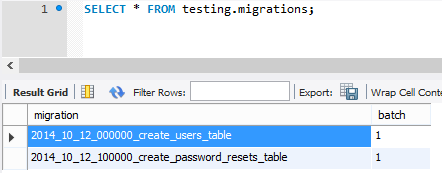 Now let's just open a default Laravel migration file 2014_10_12_000000_create_users_table.php and rename it to a month earlier and a table categories. Don't forget to rename a classname too, here's how new file 2014_09_12_000000_create_categories_table.php looks:
use Illuminate\Database\Schema\Blueprint;
use Illuminate\Database\Migrations\Migration;

class CreateCategoriesTable extends Migration
{
    /**
     * Run the migrations.
     *
     * @return void
     */
    public function up()
    {
        Schema::create('categories', function (Blueprint $table) {
            $table->increments('id');
            $table->string('name');
            $table->timestamps();
        });
    }

    /**
     * Reverse the migrations.
     *
     * @return void
     */
    public function down()
    {
        Schema::drop('categories');
    }
}
So now we have three files in migrations folder.
 Now, let's run artisan migrate. What do you think will happen? Will it fail? Will it generate the table? Here's the result:
 As you can see, it all went ok. Migration file launched successfully - here's the updated migrations table:
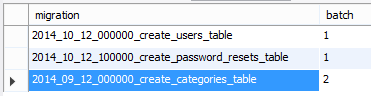 So there's a new batch created - that's it. Actually, Laravel doesn't really care about migration file names, it just checks the whole folder and runs all the files that are not present in migrations table. That date-time prefix in filenames is just a helping hand for developers to remember when it was actually done. So if you need to add past migration with a different date than today - as you can see, there's no problem.

No comments yet…