
This course is about security of Laravel projects, but focused on recent supply-chain attacks aiming at Laravel/PHP packages.
The main question is this: how can we protect our code repositories, servers, and even local environments/computers from malware stealing our data?
For that, we will analyze the recent supply-chain attack on laravel-lang/* packages. Laravel community was "shaken" by this tweet, on Saturday, May 23rd.
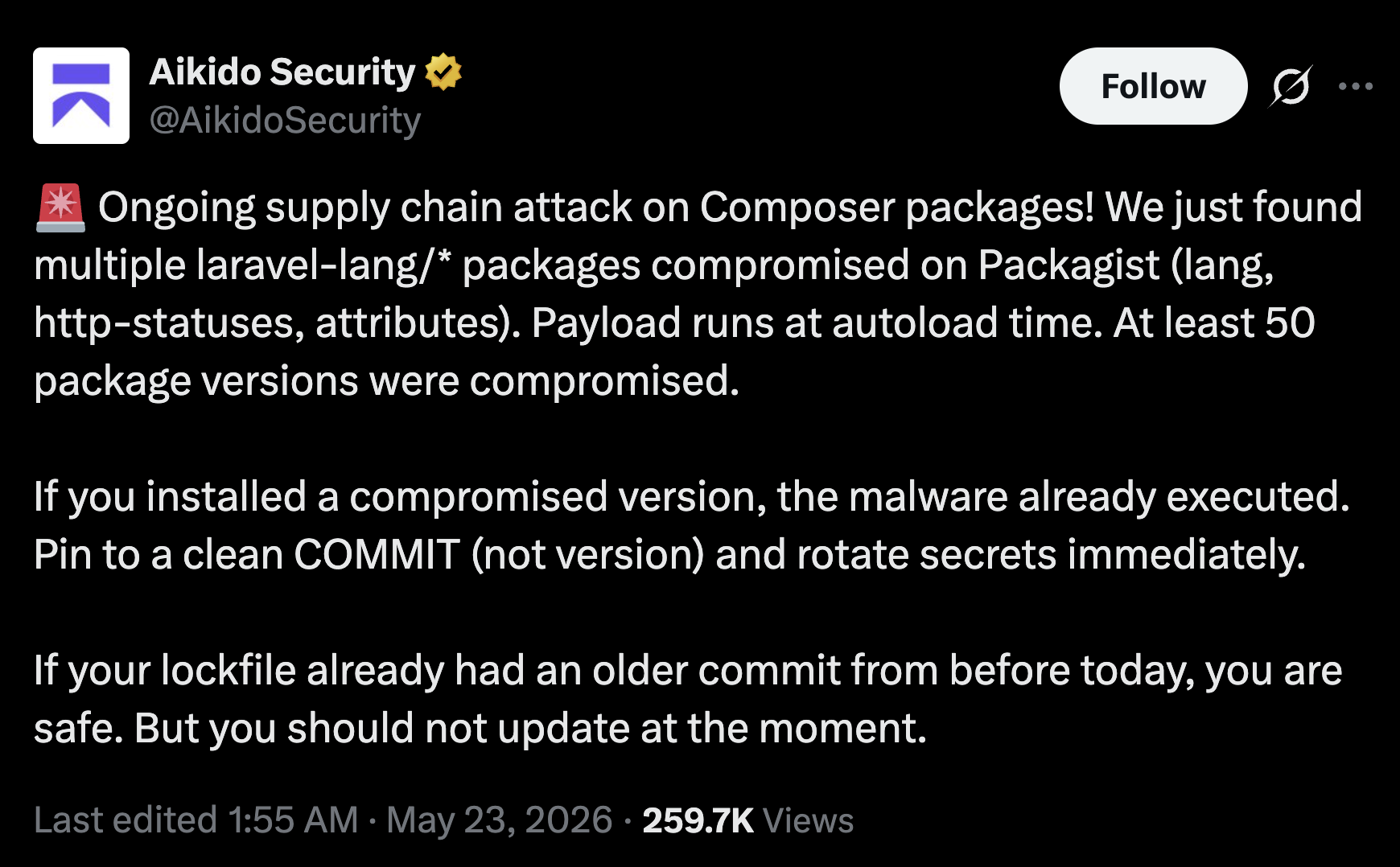
I personally expect more similar stories, so my goal is to get you prepared for what's coming.
First, you need to realize how serious this is. It's much more important and harmful than "classical" SQL injection or XSS attacks.
So, listen up.
What Happened in the Laravel-Lang Attack
On May 22, 2026, three popular Laravel packages — laravel-lang/lang, laravel-lang/attributes, and laravel-lang/http-statuses — on Packagist were tagged with a credential-stealing malware payload.
Here's a detailed report by Aikido Security, but the main thing is this: if you ran composer install or composer update on a project depending on them, the malware was auto-installed into your repository.
Then, every time anything in your project loaded vendor/autoload.php — a web request, an Artisan command, a test run — the malware ran.
Almost every Laravel request starts with this line:
require __DIR__.'/../vendor/autoload.php';That file is generated by Composer. Its job is to wire up every installed package — registering classes, loading helper files, and making everything available to your application without you having to require each file by hand.
Yes, you've read it right: you didn't need to use any code from that specific package. The malicious script was executed during autoload. So, the laravel-lang/* package wasn't the target: it was just the "foot in the door" for the malware to access your repository and environment.
What the Malicious Code Actually Did
In this case, once installed, the code did three things:
- Marked your machine as infected. It created a small marker file so it wouldn't run twice on the same host.
- "Phoned home". It contacted a remote server (
flipboxstudio.info) and downloaded a second-stage payload — roughly 5,900 lines of PHP designed to steal credentials. - Scanned everything it could find. Then it encrypted the results and sent them back to the attacker.
That's it. No flashy "you've been hacked" message. Most developers wouldn't have noticed anything at all.
What the Attacker Was After
That second-stage payload was trying to steal all possible credentials it could find on your machine. Yes, that means your laptop or desktop computer (or any machine where composer update was executed).
The script looked for:
- AWS, GCP, and Azure credentials
- DigitalOcean, Heroku, Vercel, Netlify, Railway, and Fly.io tokens
- GitHub, GitLab, and Hub CLI tokens
- SSH private keys
- Kubernetes config files (
kubeconfig,/etc/kubernetes/admin.conf) - All
.envfiles in the working directory - Browser-saved passwords (Chrome, Firefox, Edge, Brave, and more)
- Password manager vaults (KeePass, 1Password, Bitwarden local files)
- Slack, Discord, and Telegram tokens
- Cryptocurrency wallets
Basically: if it was a secret on your machine, it was a target.
A snapshot of a typical Laravel developer's machine:
~/.aws/credentials # production AWS keys~/.config/gh/hosts.yml # GitHub token with push access~/.ssh/id_ed25519 # production server access~/Code/client-a/.env # DB, Stripe, Mailgun, AWS~/Code/client-b/.env # different production stack~/.zsh_history # leaked db passwords, tokens~/Library/.../Chrome/Login Data # saved Forge, Cloud, AWS sessionsEvery one of those is readable by any code running as your user — including code from a Composer package you just installed.
So, now you probably understand how serious this is.
Such attacks are not about this specific package or your Laravel/PHP project — they are about stealing credentials from your machine that may be totally unrelated to Laravel.
Your laptop is no longer "just a development machine."
How This Worked: Git tags
The attacker pushed the malicious code into the repositories, but in a very sneaky, invisible way — through git tags.
The entry point was likely a compromised GitHub token or credential of the laravel-lang package maintainer. This is a signal for all of us to protect our GitHub credentials, because the same may happen to our GitHub repositories, too.
The clever part isn't that they bypassed access. It's what they did with it.
They exploited a GitHub quirk: a version tag in a repository can point to a commit that lives in a fork of that repository, not in the repo itself. So instead of committing malicious code into laravel-lang/lang (where anyone watching the repo would see it), they:
- Forked the repository.
- Added the malicious code in their fork.
- Created version tags in the official repo pointing at commits in their fork.
Packagist resolved those tags and served the malicious code. Meanwhile, anyone looking at the official laravel-lang/lang repo on GitHub saw a perfectly clean commit history — because the bad code never lived there.
So, in summary:
- The repos looked normal.
- The commit history looked normal.
- The package looked legitimate.
- Yet the code that actually got installed was malicious.
How It Was Stopped
Aikido Security flagged the suspicious packages and reported them to the maintainers and to Packagist.
Packagist responded quickly:
- Removed the affected versions
- Temporarily unlisted the packages to prevent further installs
But here's the catch: if you had already installed a compromised version, the damage was done. Removing a package from Packagist doesn't un-execute code on machines that already pulled it down.
This is one of the most important things to understand about supply-chain attacks: detection and takedown happen after the harm.
Main Point: Do You TRUST The Dependency You're Installing?
When you run:
composer require somepackage/somethingYou are not just downloading code.
You are effectively saying:
I trust this package to run any code it wants, on my machine, with my user's permissions — possibly during install, and possibly forever after.
That's not a paranoid framing. That's the reality of how Composer and PHP autoloading work.
The same applies to:
- the dependencies of your dependencies
- dev dependencies (
require-dev) - packages you only "tried out" once and forgot about
- packages installed globally with
composer global require
So yes, if you haven't internalized it yet, I'll repeat it one more time: this thing is serious.
Now, in the next lesson, let's start talking about what you/we can do about it.
This is very helpful, thanks.