
Laravel AI SDK recently released a new v0.10, with new features, some them announced at Laracon US 2026 in Boston. This tutorial shows four practical features from this new version. But it may also be useful if you have not tried the Laravel AI SDK before. Let's dive in.
Feature 1/4. Filesystem Tools for AI Agents.
The first example is two features in one. The Laravel AI SDK provides built-in file storage tools, while human tool approval lets a person review sensitive actions before they run.
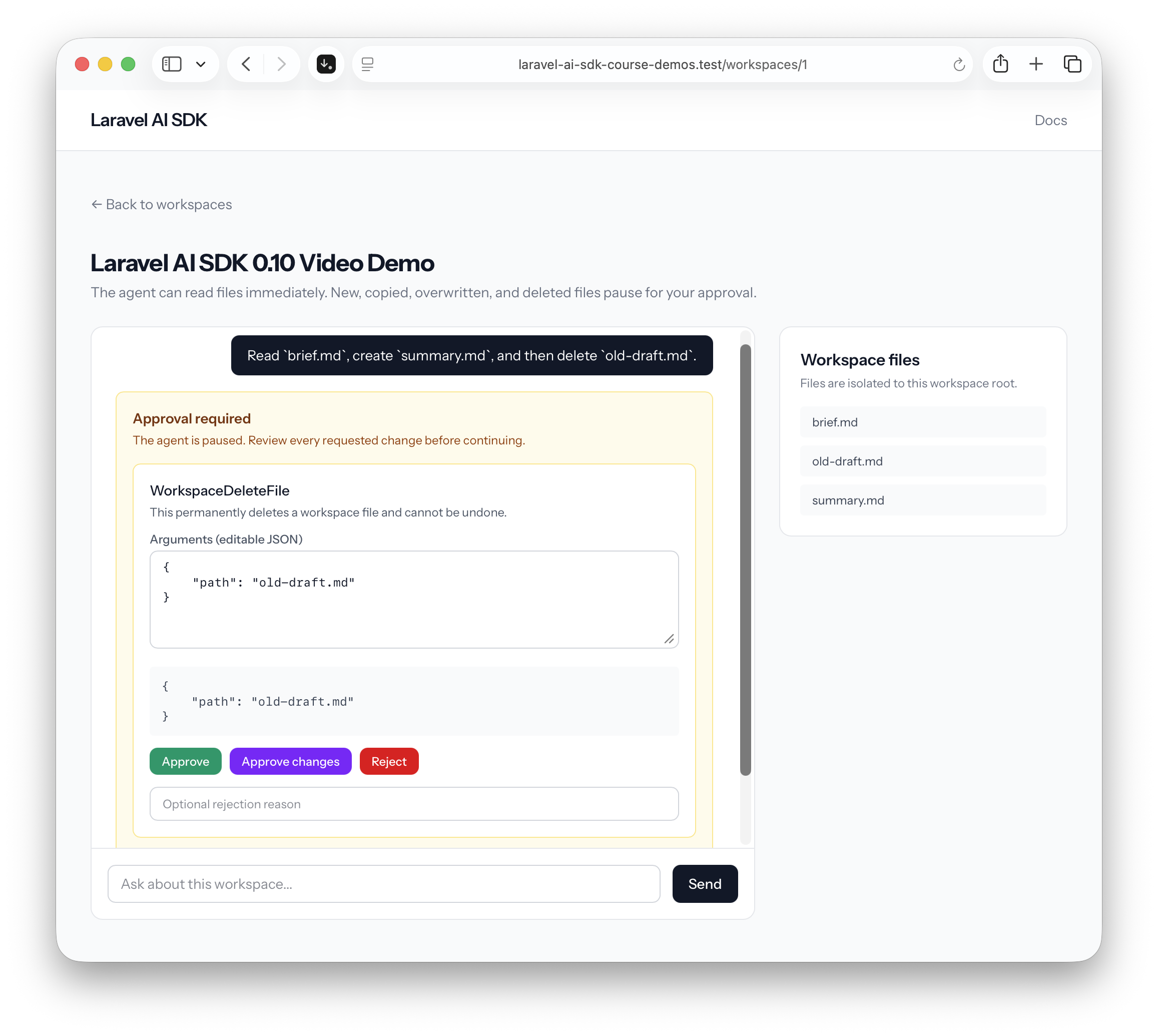
Imagine that an application has workspace files. We want to give an agent this prompt in human language:
Read
brief.md, createsummary.md, and then deleteold-draft.md.
The Laravel AI SDK can give the agent access to a Laravel filesystem disk. However, allowing an agent to change or delete files is risky.
In this example, every workspace has its own isolated disk, so the agent cannot access another workspace's files:
app/Models/Workspace.php:
use Illuminate\Database\Eloquent\Model;use Illuminate\Filesystem\FilesystemAdapter;use Illuminate\Support\Facades\File;use Illuminate\Support\Facades\Storage; class Workspace extends Model{ public function disk(): FilesystemAdapter { File::ensureDirectoryExists($this->rootPath()); return Storage::build([ 'driver' => 'local', 'root' => $this->rootPath(), 'throw' => true, ]); } public function rootPath(): string { return storage_path('app/private/workspaces/'.$this->getKey()); }}The FileWorkspaceAgent gets that disk and adds its filesystem tools. FileStorage::readOnly() gives the agent the safe tools for listing and reading files. The example then adds custom tools for writing, copying, and deleting files:
app/Ai/Agents/FileWorkspaceAgent.php:
use App\Ai\Tools\WorkspaceCopyFile;use App\Ai\Tools\WorkspaceDeleteFile;use App\Ai\Tools\WorkspaceWriteFile;use App\Models\Workspace;use Laravel\Ai\Attributes\MaxSteps;use Laravel\Ai\Attributes\Provider;use Laravel\Ai\Concerns\RemembersConversations;use Laravel\Ai\Contracts\Agent;use Laravel\Ai\Contracts\Conversational;use Laravel\Ai\Contracts\HasTools;use Laravel\Ai\Promptable;use Laravel\Ai\Tools\FileStorage; #[Provider('openai')]#[MaxSteps(5)]class FileWorkspaceAgent implements Agent, Conversational, HasTools{ use Promptable, RemembersConversations; public function __construct(public Workspace $workspace) {} public function instructions(): string { return <<<'INSTRUCTIONS'You are a file workspace assistant. Work only with files in the current workspace. Rules:- Use the filesystem tools to inspect or change files; never claim an operation succeeded without using a tool.- Paths are relative to the workspace root. Never attempt to access a parent directory or another workspace.- Ask for clarification when a requested source or destination is ambiguous.- Explain what changed after an approved mutation.INSTRUCTIONS; } public function tools(): iterable { $disk = $this->workspace->disk(); return FileStorage::readOnly($disk)->merge([ new WorkspaceWriteFile($disk), new WorkspaceCopyFile($disk), new WorkspaceDeleteFile($disk), ]); }}The custom write tool implements Approvable and uses InteractsWithApprovals. Its needsApproval() method returns the message that will be shown in the chat:
app/Ai/Tools/WorkspaceWriteFile.php:
use Laravel\Ai\Approvals\Approval;use Laravel\Ai\Concerns\InteractsWithApprovals;use Laravel\Ai\Contracts\Approvable;use Laravel\Ai\Tools\Filesystem\WriteFile;use Laravel\Ai\Tools\Request; class WorkspaceWriteFile extends WriteFile implements Approvable{ use InteractsWithApprovals; protected function needsApproval(Request $request): Approval { $path = (string) $request->string('path'); return Approval::required( $this->fileExists($this->disk(), $path) ? "This overwrites the existing file [{$path}]." : "This creates the new file [{$path}]." ); }}The delete tool works in the same way. Its approval message clearly says that the action cannot be undone:
app/Ai/Tools/WorkspaceDeleteFile.php:
use Laravel\Ai\Approvals\Approval;use Laravel\Ai\Concerns\InteractsWithApprovals;use Laravel\Ai\Contracts\Approvable;use Laravel\Ai\Tools\Filesystem\DeleteFile;use Laravel\Ai\Tools\Request; class WorkspaceDeleteFile extends DeleteFile implements Approvable{ use InteractsWithApprovals; protected function needsApproval(Request $request): Approval { return Approval::required( 'This permanently deletes a workspace file and cannot be undone.' ); }}When we send the prompt, the agent reads brief.md and prepares the contents of summary.md. It does not write the file yet. The agent pauses and asks for approval. The user can approve, edit the arguments before approval, or reject the action.
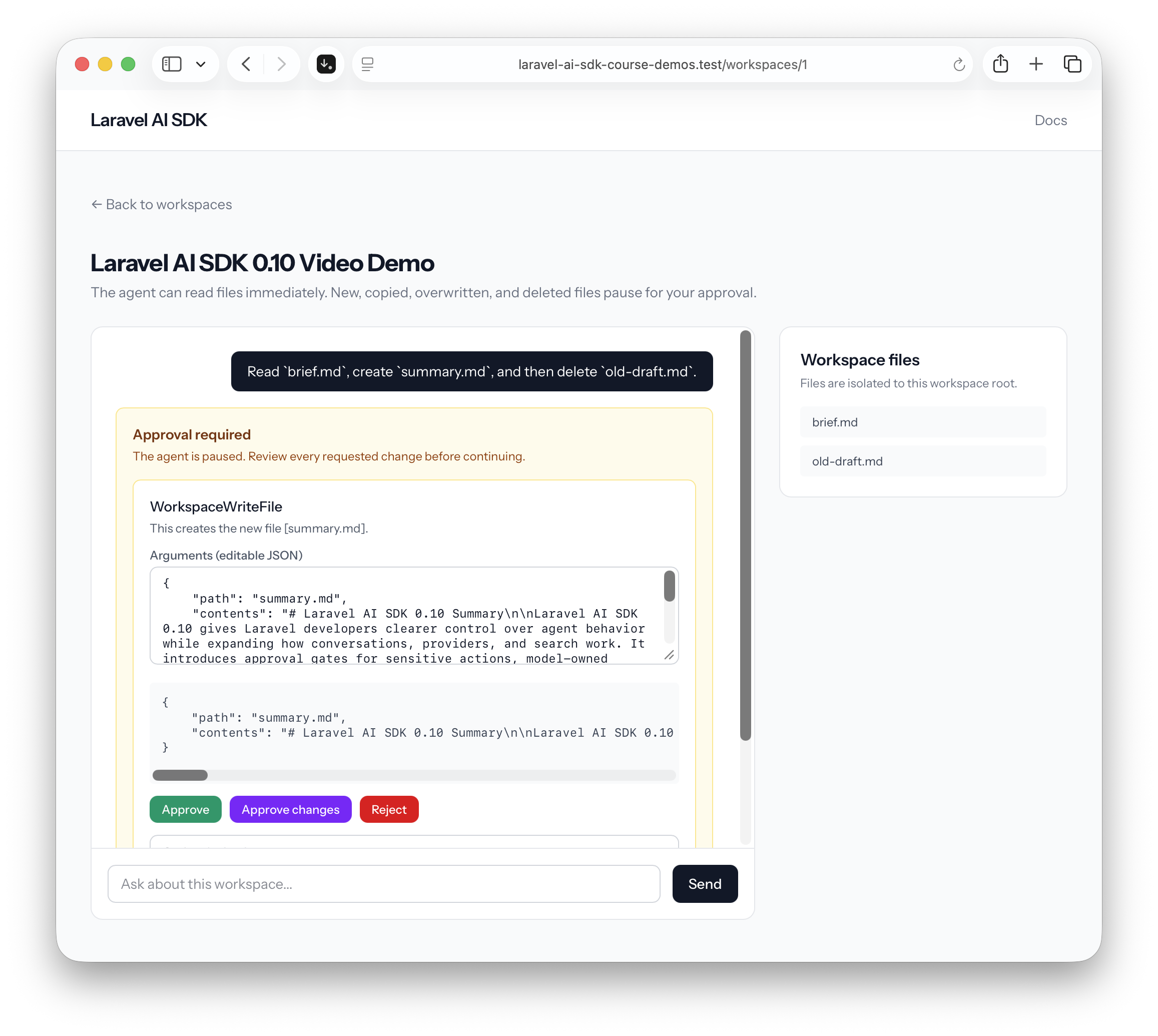
After we approve the first action and continue the conversation, summary.md appears in the list of workspace files. The agent then pauses again before deleting old-draft.md.
The chat is a Livewire component. When the user sends a message, it prompts the agent. When there is a pending approval, the component continues the same stored conversation with a decision for each tool call:
app/Livewire/WorkspaceChat.php:
use App\Ai\Agents\FileWorkspaceAgent;use App\Models\Workspace;use InvalidArgumentException;use Laravel\Ai\Approvals\Decision;use Laravel\Ai\Approvals\Decisions;use Laravel\Ai\Responses\AgentResponse;use Livewire\Component; class WorkspaceChat extends Component{ public Workspace $workspace; public array $messages = []; public array $pendingApprovals = []; public array $approvalActions = []; public array $rejectionReasons = []; public array $editedArgumentsJson = []; public string $prompt = ''; public ?string $conversationId = null; public function sendMessage(): void { $this->validate([ 'prompt' => ['required', 'string', 'max:2000'], ]); $prompt = $this->prompt; $this->messages[] = ['role' => 'user', 'content' => $prompt]; $response = $this->agent()->prompt($prompt); $this->recordResponse($response); $this->prompt = ''; } public function resolveApprovals(): void { $decisions = []; foreach ($this->pendingApprovals as $approval) { $id = $approval['id']; $action = $this->approvalActions[$id]; $editedArguments = json_decode( $this->editedArgumentsJson[$id] ?? '{}', true, ); if ($action === 'edit' && ! is_array($editedArguments)) { $this->addError('approval', 'Edited arguments must be valid JSON.'); return; } $decisions[$id] = match ($action) { 'approve' => Decision::approve(), 'reject' => Decision::reject( $this->rejectionReasons[$id] ?? null, ), 'edit' => Decision::edit($editedArguments), default => throw new InvalidArgumentException( 'Unknown approval action.', ), }; } $response = $this->agent() ->continue($this->conversationId ?? '', as: $this->workspace) ->prompt(Decisions::from($decisions)); $this->recordResponse($response); } private function agent(): FileWorkspaceAgent { $agent = new FileWorkspaceAgent($this->workspace); return $this->conversationId === null ? $agent->forParticipant($this->workspace) : $agent->continue( $this->conversationId, as: $this->workspace, ); } private function recordResponse(AgentResponse $response): void { $this->conversationId = $response->conversationId; $this->pendingApprovals = $response->pendingApprovals ->map(fn ($approval): array => $approval->toArray()) ->all(); if (filled($response->text)) { $this->messages[] = [ 'role' => 'assistant', 'content' => $response->text, ]; } }}In this example, the first approval creates summary.md. The second approval deletes old-draft.md. The agent can access file storage, but a person stays in control of sensitive changes.
Feature 2/4. Summarize Any String.
Laravel's...
I wonder what index type and db version you are using on the embedding column. The hnsw (default by ai sdk) only allows dimension of up to 2000 whereas your model is using 3072. Maybe you are you using diskann or did I miss something?
This example doesn’t use an index on the embedding column, so it’s doing an exact vector search rather than using HNSW.