
One of the less-known Laravel features is Login throttling. By default, if user tries to log in via default Laravel login form more than 5 times per minute, they will get different error message.
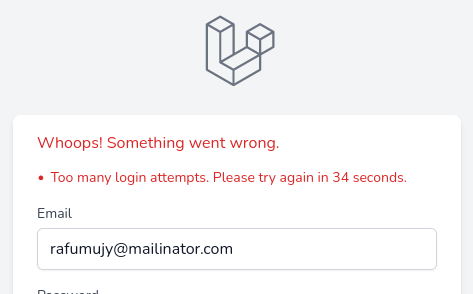
Yes, the error isn't just “wrong password”. It's “Too many login attempts. Please try again in X seconds.”
By default, that X is 60, so Laravel restricts login attempts for one minute. But you can customize it.
Laravel Breeze & New Starter Kits
Breeze and the new starter kits React and Vue versions tries to authenticate the user in the App/Http/Requests/Auth/LoginRequest.php class, in the authenticate() method. In this method, there is a line that hits RateLimiter.
RateLimiter::hit($this->throttleKey());If you check https://github.com/laravel/framework/blob/master/src/Illuminate/Cache/RateLimiter.php file where hit method is located, you will see that it accepts the second parameter decaySeconds which defaults to 60 seconds. So to change that time, you just need to pass your desired time as the second parameter in LoginRequest.php file. For example, if you want to limit it for 120s, it would be.
RateLimiter::hit($this->throttleKey(), 120);That's all about the time limit, but what about limiting how many attempts? Well, it's also very easy. If we look at the same if check line in the LoginRequest.php:
if (! RateLimiter::tooManyAttempts($this->throttleKey(), 5)) {That number 5 is the count of how many attempts a user can make. Just change that number to whatever you need.
Livewire kit have two options:
- Livewire components
- Class-based Volt components
For the Livewire component authentication component is app/Livewire/Auth/Login.php. For the Volt component Blade file location is resources/views/livewire/auth/login.blade.php. The same methods are used in these two files to rate limit the authentication. Change limits to your needs.
Laravel Jetstream
Jetstream uses Laravel Fortify for handling authentication. If you open app\Providers\FortifyServiceProvider.php, in the boot method you should immediately see RateLimiter for login. Specifically this line:
return Limit::perMinute(5)->by($email.$request->ip());By default, as in other starter kits, it's 5 times per minute, which you can change here. If you want to change the time, Limit has more methods than perMinute. You can find them and check what parameters they take in the official laravel GitHub repository here https://github.com/laravel/framework/blob/master/src/Illuminate/Cache/RateLimiting/Limit.php.
How to rate limit user registrations (not logins) in Jetstream? This does not seem to work:
Thanks.