
Quick tip of the day. Default Laravel Auth comes with User table and model, but without logging capability, so we need to build it ourselves. Fortunately, it's very easy, I will show you one method.
Let's say that we want to save user's last login time and IP address in the same users table. So we start with database migration:
php artisan make:migration add_login_fields_to_users_tableThen we fill it with these fields:
return new class extends Migration{ public function up() { Schema::table('users', function (Blueprint $table) { $table->datetime('last_login_at')->nullable(); $table->string('last_login_ip')->nullable(); }); }// ...Next, we need to add these fields as fillables in app/Models/User.php model:
class User extends Authenticatable{ protected $fillable = [ 'email', 'password', 'name', 'last_login_at', 'last_login_ip', ]; // ...Finally, how do we fill them in? Well, it depends how on which starter kit you are using. I'm going to show you that using Laravel Breeze, Laravel Jetstream, and the new starter kits, which were introduced with Laravel 12.
Laravel Breeze & New Starter Kits
Breeze and the new starter kits React and Vue uses the app/Http/Controllers/Auth/AuthenticatedSessionController.php controller for authentication. In that controller, there is a store method, which is called after you press login button. Just before redirecting, after successful authentication, let's add our code for the update.
$request->user()->update([ 'last_login_at' => Carbon::now()->toDateTimeString(), 'last_login_ip' => $request->getClientIp(),]);Livewire kit have two options:
- Livewire components
- Class-based Volt components
For the Livewire component authentication component is app/Livewire/Auth/Login.php. For the Volt component Blade file location is resources/views/livewire/auth/login.blade.php. For your option, just before redirecting, after successful authentication, add code for the update:
auth()->user()->update([ 'last_login_at' => Carbon::now()->toDateTimeString(), 'last_login_ip' => request()->getClientIp(),]);Laravel Jetstream
Jetstream uses Laravel Fortify for handling authentication. To save additional data, we will need to customize users authentication. Typically this should be done in the JetstreamServiceProvider file, in the boot method.
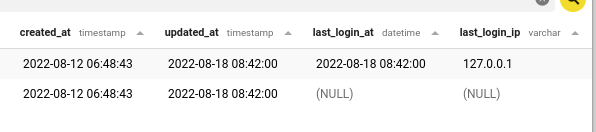
public function boot(){ // ... Fortify::authenticateUsing(function (Request $request) { $user = User::where('email', $request->email)->first(); if ($user && Hash::check($request->password, $user->password)) { $user->update([ 'last_login_at' => Carbon::now()->toDateTimeString(), 'last_login_ip' => $request->getClientIp() ]); return $user; } });}And, that's it! Here's what we have in users table after log in:
Saved me a lot of time - Thanks! :)
Thanks for this One thing I noticed was that when a user performs a password reset (/password/reset) Laravel 10 - the authenticated does not fire - IE I have no entry for last_*
i think beacuse you don't pass in the same fortify controller methiod....from what i understood
As always, excellent explanations
i am looking to Save User's Last Login Time and IP Address using Filament
For that you need to create a new Filament Login page and add the logic there
how i want user device so what can i do ? my english weak