
In reports or tables, you often need to show one record with all its "children" records on the same line, separated by a comma. In this tutorial, I will show you TWO ways to achieve that in Laravel.
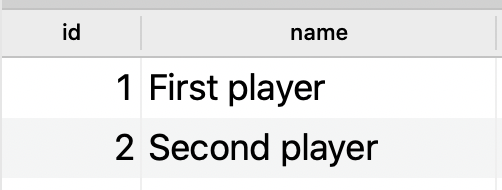
Let's imagine you have a relationship of Player -> hasMany -> Game with a score for each game.
players table:
games table:
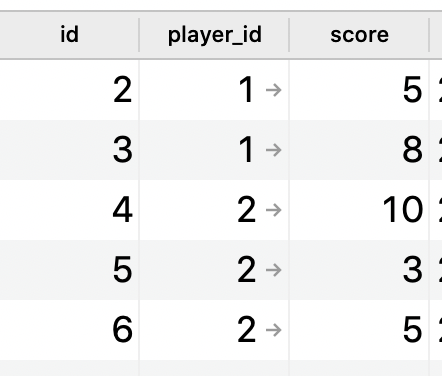
Your task is to show all the players with all their scores separated by a comma. Something like this table:

Or, in a Laravel Collection form:
Illuminate\Database\Eloquent\Collection {#2285 all: [ App\Models\Player {#2287 name: "First player", scores: "5,8", }, App\Models\Player {#2284 name: "Second player", scores: "10,3,5", }, ], }I will show you a few ways.
Option 1. Collection methods: pluck() and implode()
Controller:
$players = Player::with('games')->get();Blade:
@foreach ($players as $player) <tr> <td>{{ $player->name }}</td> <td>{{ $player->games->pluck('score')->implode(',') }}</td> </tr>@endforeachAs you can see, the pluck() method forms the Collection of just score column values, and then implode() transform the Collection into a comma-separated string.
You could improve the performance by loading only the relationship fields that you actually need:
$players = Player::with('games:player_id,score')->get();But, in terms of performance, there's a better way.
Option 2. MySQL: GROUP_CONCAT() method
Why load all the relationship rows/columns and make the Collection work if we can ask the database to group that for us?
Here's the Query Builder raw query utilizing MySQL:
$players = Player::query() ->selectRaw('players.name, GROUP_CONCAT(games.score) as scores') ->join('games', 'players.id', '=', 'games.player_id') ->groupBy('players.name') ->get();Then, in Blade:
@foreach ($players as $player) <tr> <td>{{ $player->name }}</td> <td>{{ $player->scores }}</td> </tr>@endforeachThe GROUP_CONCAT() function uses a comma as the default separator, but you can customize it, read the official MySQL documentation for all the options.
No comments yet…