
In this lesson, we will create a Livewire component for creating and editing orders. We will reuse some logic from before lessons, like select2 component or Pikaday, so not everything new will be new here.
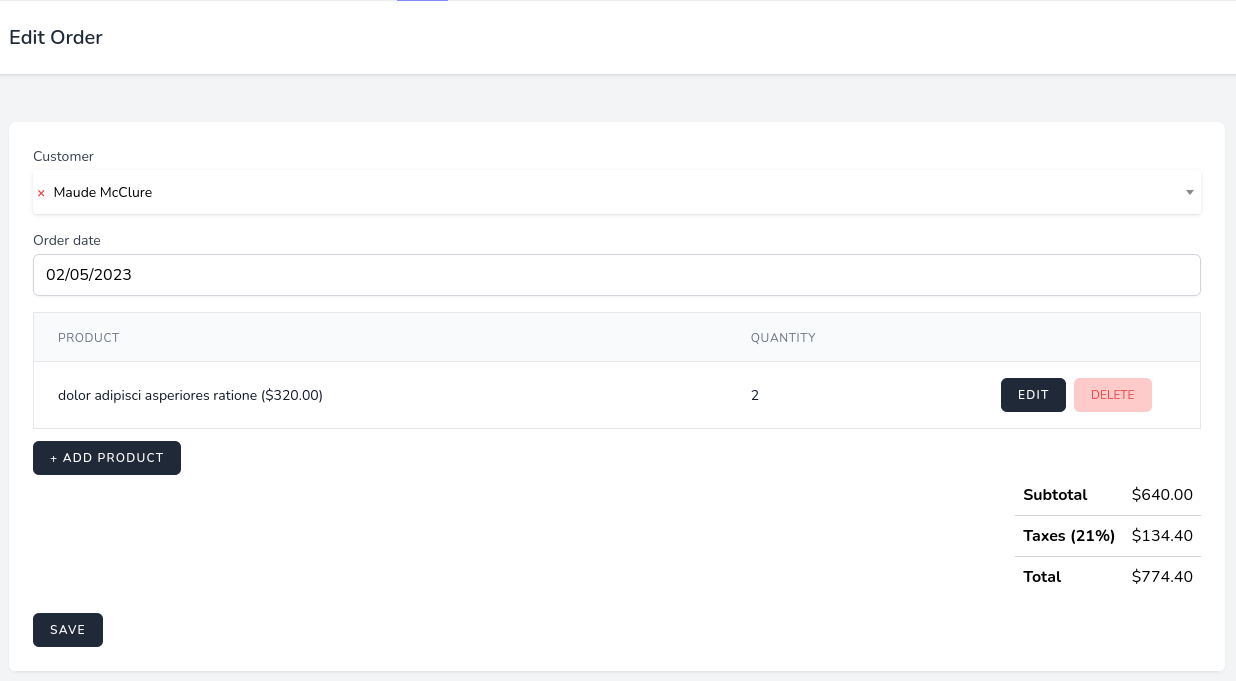
Again, let's start this lesson by creating the Livewire component, Route Model binding Order and we will add a frontend layout with hard-coded data. Next, as this is a new component we need to register a route for it and make the Create and Edit buttons work. Also, to bind the input to the $order property we need validation rules, so let's also add them now...
Everything fine but EDIT order.
I keep getting an error: > A non-numeric value encountered
in the render function view line:
Creating is working fine. I have dd() for checking no nulls and everything is ok and also checked the table in MySQL.
Any ideas, please?
Hard to "blindly" debug it for you, any of those three variables could be "non-numeric" technically. Could you
var_dump()all of those separately and see the values?I understand, of course. I have dd(productPrice) inside OrderForm.php and when creating it returns the product value of 44 as 4400 but when I try to edit that order, it returns an array with dots and commas, as "4,400.00". I think I will have to check if isNumeric and if it is not convert it all the time. By the way, here in Spain, using Euros, I usually put the price as float with 2 decimal number. I understood you advice to use integer and use the two last digits as decimals. In which way is this better, please?
Thanks in advance for your help and advice.
Technically speaking, dealing with money is even more complicated, I suggest you read this in-depth article: Dealing With Money in Laravel/PHP: Best Practices
Regarding that it comes with dots and commas, this is interesting, for some reason it didn't happen during my testing. If you are unable to debug it yourself, you could push your code to GitHub and invite me (username PovilasKorop), I may take a look but only in a week or so.
Everything fine but when EDIT order in all orders page. it show A non-numeric value encountered error
$this->order->subtotal += $orderProduct['product_price'] * $orderProduct['quantity'];
in render function
i download your code from github it works fine when i order two product then i try two edit from product list it shows the same error please check A non-numeric value encountered
some of orders edit working and some orders edit showing error A non-numeric value encountered in your github code please check
Can you help to debug find those "some"? How exactly we can reproduce this: just by clicking around on random orders edit?
Dear sir, please check i shared a screen recording of the error. uploded on youtube link is unlisted. this is the link of the video
https://youtu.be/0_DGOIUJnhg
order price under six digit edit working but when it crossed seven digit or above for example like $57,356.30, $30,233.06, $96,285.75 it shows the A non-numeric value encountered error
Great, thanks! Now the error is clear, we need to debug and fix from our side, will update on this.
You can check this commit to see what was changed. Hope it helps other :)
if you try to edit an order adding a product that all ready exists in the order an save it, this last product wont get saved
Updating a product is only validated frontend. How can this be achieved also backend?
Add validation rules. What exactly you wamt to validate?
Both the products id and the products quantity. Just good practice. I don't know how to achieve this since the rules method is already "taken" by the Order. But I am eager to learn.
If you mean that product id should exist then there is exists validation rule. As for quantity depends what you want. If you have some stock then the rule should be Less Than Or Equal.
Thanks. I am familiar with the rules. But it's not that. Instead, it's that the product is "dynamic" when it hits the saveProduct() method. So, how do I validate and how do I send any error back to the view from a failed product validation? Also the form should show any passed values (can old method be used?)
With livewire old isn't needed. When you hit in this
saveProduct()call the$this->validate()and livewire will validate with your rules.So, I do that and add this line to rules():
'quantity' => ['required', 'numeric', 'min:3'],(min:3 doesn't make sence here, it is just demonstrate that your sugestion doesn't work. ) Now, storing a quantity of 2 is still fine. I belive it is more complicated than that and therefor I ask for help. Let's aggree that a form shall have backend validation.Without full code cannot help. Come to discord and try asking there.
You just have to add these line of code to see it fail...
The first code block in the tutorial for order-form.blade.php contains this line;
It is missing the data binding for selectedOptions and will throw an unresolvable dependency error, replace with this;