
Text Version of the Lesson
Looking at the previous example of country/city form, let's talk about binding the inputs to properties and saving their data.
We have three goals in this lesson:
- Submit the form to save data to DB
- Show the success alert
- Clear the form inputs
All without the page refresh.
Simple Tailwind Design
To demonstrate the form refresh without the full page refresh, I've added a very simple Tailwind design (thanks ChatGPT):
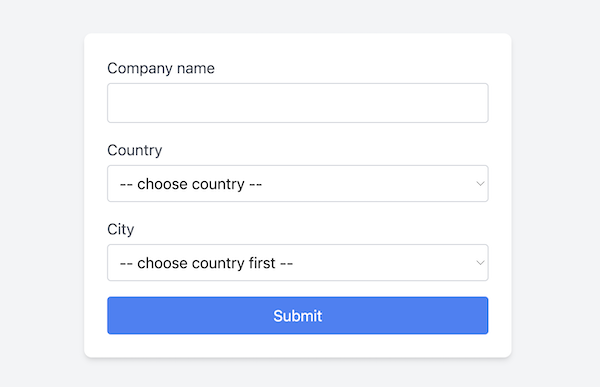
Here's the updated HTML of the Blade files.
resources/views/companies/create.blade.php:
<!DOCTYPE html><html lang="en"><head> <meta charset="UTF-8"> <meta name="viewport" content="width=device-width, initial-scale=1.0"> <title>Simple Form</title> <script src="https://cdn.tailwindcss.com"></script></head><body class="flex items-center justify-center min-h-screen bg-gray-100"> <livewire:company-create /></body></html>And then the dynamic Livewire blade:
resources/views/livewire/company-create.blade.php:
<div class="w-full max-w-md p-6 bg-white rounded-lg shadow-md"> <form> <div class="mb-4"> <label for="name" class="block text-gray-700">Company name</label> <input wire:model="name" type="text" required id="name" class="w-full p-2 mt-1 border rounded border-gray-300 focus:outline-none focus:ring-2 focus:ring-blue-500"> </div> <div class="mb-4"> <label for="country" class="block text-gray-700">Country</label> <select wire:model.live="country" required id="country" class="w-full p-2 mt-1 border rounded border-gray-300 focus:outline-none focus:ring-2 focus:ring-blue-500"> <option value="">-- choose country --</option> @foreach ($countries as $country) <option value="{{ $country->id }}">{{ $country->name }}</option> @endforeach </select> </div> <div class="mb-4"> <label for="city" class="block text-gray-700">City</label> <select wire:model="city" required id="city" class="w-full p-2 mt-1 border rounded border-gray-300 focus:outline-none focus:ring-2 focus:ring-blue-500"> @forelse($cities as $city) <option value="{{ $city->id }}">{{ $city->name }}</option> @empty <option value="">-- choose country first --</option> @endforelse </select> </div> <button type="submit" class="w-full p-2 text-white bg-blue-500 rounded hover:bg-blue-600">Submit</button> </form></div>The important bits for us are the Livewire bindings for three fields:
-
input wire:model="name" -
select wire:model.live="country"(why ".live?" - we'll discuss in a minute) -
select wire:model="city"
With those wire:model pieces, we bind the Blade/HTML inputs to the...
There is another way that I found to solve the same bug:-
Instead of adding:- $this->city = $this->cities->first()->id; in the updated webhook.
What I did:-
I used a flash message instead of defining another property on the component: